

Read your own Chinese EPUB on iPhone
Import Chinese books into Laowai and look up words as you read. The instructions below cover supported files, reading settings and common import problems.
Try the reading activity · Open the printable student sheet and teacher notes

Dictionary search stays free. Laowai Pro unlocks unlimited practice, unlimited widgets and Live Activities, and iCloud sync. Prices and subscription terms appear before purchase. Requires iOS or iPadOS 26 or later.
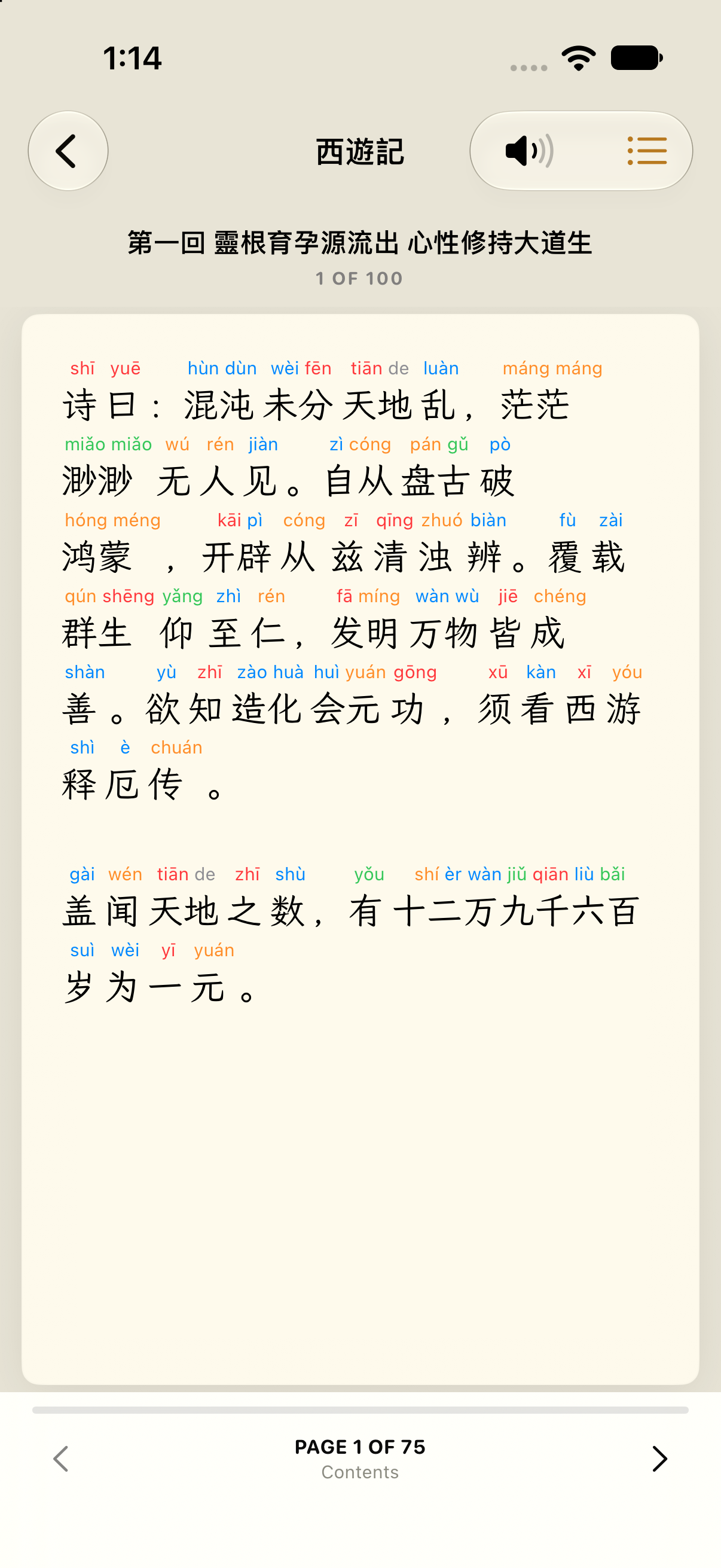
Import a Chinese book or text
The reader supports EPUB, TXT and FB2 files. Use your own writing or material you have permission to import. EPUB and FB2 books need to contain mostly Chinese, readable text.
- Save the file to Files. Download your book or the original TXT activity below. If the file is stored in a cloud folder, make sure it has finished downloading before you import it.
- Open Library → Your texts in Laowai. Use Import to open the file picker. In an empty library, choose File under Import a text.
- Select your EPUB, TXT or FB2. Wait for the import to finish, then open the text. EPUB and FB2 books can appear with chapters; a TXT file is plain text.
- Read a short section. Look up an unfamiliar word, check its meaning in context and return to the reader.
- Save words for practice. Save the words you want to practise, then return to the text at your next reading session.
The text remains in Your texts so you can open it again. Keep your original file as well. See a complete reading-to-vocabulary routine using a short story.
Show pinyin and adjust text size
In Settings, the Reading and text section includes Show pinyin and Reading size. Use pinyin when you need help with pronunciation, and hide it when you want to practise recognising the characters. You can also choose the character set there.
To read on this website, try our three short readings. Each lets you show or hide pinyin, reveal English translations and answer a comprehension question. These website controls are separate from your app settings.
If a file will not import
The file is unavailable in the picker
Check that it has finished downloading in Files and that its format is EPUB, TXT or FB2. A PDF is not one of the book formats supported by this import action. Renaming a file’s extension does not convert it.
Laowai says no readable text was found
Check whether the document contains selectable text. A book made from page images is different from a text-based EPUB. Try the small original TXT download below to check the basic import path.
The EPUB or FB2 is incomplete or unsupported
Try downloading or exporting the file again from its legitimate source. An encrypted or otherwise unsupported book may not supply readable text to the importer. Use a compatible edition you have permission to read; Laowai’s import is not a tool for removing copy protection.
The book is not mostly Chinese
Choose a Chinese-language EPUB or FB2. A bilingual edition with long English sections may not meet the reader’s Chinese-content requirement. For a short text you wrote yourself, you can save the Chinese passage as a TXT file.
The file is too large or its text looks wrong
Try a smaller document. For your own TXT file, export it as UTF-8 plain text and check that it displays correctly before importing again. Keep the original file while you test another export.
If the small sample imports but your book does not, contact support with the file format and the error message. You do not need to send the whole book or private text to describe the problem.
Try a four-sentence reading activity
This four-sentence passage is about reading on the commute.
我每天坐地铁去上班。
路上我喜欢读中文。
看到不认识的词,我会查词典。
晚上我再复习这些词。
I take the subway to work every day. I like reading Chinese on the way. When I see a word I do not recognize, I look it up in a dictionary. In the evening, I review those words again.
- Read once and choose an unfamiliar word.
- Look it up in Laowai and check which meaning fits the sentence.
- Save unfamiliar words to a list for practice.
- Reread the passage and check whether you recognise the words you saved.
Possible vocabulary: 地铁 (subway), 路上 (on the way), 认识 (recognize; know), 词典 (dictionary), 复习 (review).
See the reader in use
See an included public-domain classic, a dictionary lookup, saving a word to Favorites and returning to the reader.
Recorded in Laowai 5.3.5 on iPhone Simulator.
Questions about importing and practice
Which files can I import?
EPUB, TXT and FB2. Import material you wrote or have permission to use.
Does the dictionary work offline?
Yes. Core dictionary search works offline after installation. Cloud sync and some media require a connection.
Is practice unlimited for free?
No. Dictionary search stays free; unlimited practice is part of Laowai Pro. Check the current offer and terms in the app before purchasing.
Try a grammar lesson or short reading.
Practise sentence patterns with examples and questions, or read a short story with pinyin and English translations.
Choose a lesson ↗