
How to import, export and share Chinese word lists
Website and app handoff
Keep the vocabulary for one book, lesson or trip together. Laowai’s website can import a list, show which words match the dictionary and export the saved selection in several formats.
Create a list from dictionary words
Open Study → My lists, enter a list name and choose Create. Save words from dictionary entries or use the list’s word tools. Use a name such as “Restaurant lesson” so the selection remains easy to recognise later.
A word can appear in several lists while keeping one shared vocabulary history. Lists organise what you study; they do not create a fresh progress record for every copy of a word.
Prepare a file and check the preview
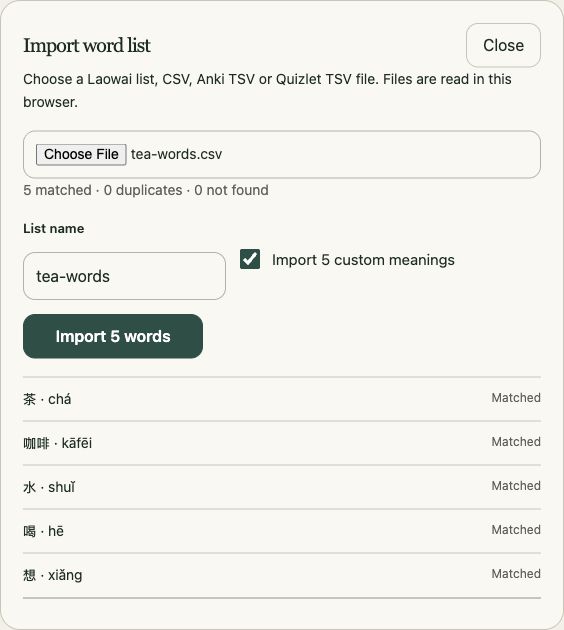
Choose Import word list in My lists. Supported choices include a Laowai list, CSV, Anki TSV and Quizlet TSV. A spreadsheet export should contain Chinese words or phrases in its first column; a header makes the other columns easier to identify.
Chinese,Pinyin,Translation
朋友,péngyou,friend
茶,chá,tea
喝,hē,to drink
- Save the file as UTF-8 CSV or TSV and choose it in the importer.
- Read the matched, duplicate and not-found totals.
- Check unfamiliar spellings and pronunciations before confirming. The preview can show more rows for a large file.
- Name the imported list. If custom meanings are present, decide whether to import them.
- Confirm the import, then open the resulting list.
The importer matches existing dictionary entries. A phrase marked Not found does not become a new dictionary entry. Split large files into batches of up to 10,000 words; the web importer accepts files smaller than 64 MB.
Choose the right export
Open a saved list and choose its export format, then Download list.
| Format | Use it for |
|---|---|
| .laowailist | Moving a vocabulary selection into Laowai, with list details and dictionary matching. |
| CSV | Editing a table of Chinese, pinyin and meanings in a spreadsheet. |
| Anki TSV | Importing text fields into a note type you choose in Anki. |
| Quizlet TSV | A two-column Chinese and meaning import. |
For a ready-made Anki deck rather than text fields, use the APKG export in the HSK set builder. Vocabulary exports do not transfer your Laowai review schedule into another study app.