
How to practise Chinese vocabulary with spaced reviews
Website
Knowing a word’s meaning does not always mean you can recall its tone or write it. Laowai Study keeps progress for separate vocabulary skills and uses that history to plan practice.
Start with a small, useful list
- Open Study. Choose My lists for words you saved, or Browse lists for a ready-made collection.
- Choose a source and open its practice action. If you have reviews due, use the review offered on the Practice screen.
- Answer before checking. Read the correction when an answer is wrong, then continue.
- At the end, check the session results. Revisit the words that you could recognise but could not produce.
For a first list, try three words from something you have just read. A list called “Tea with a friend” could contain 茶, 喝 and 朋友. Give the list a concrete purpose so you can return to the original situation.
我和朋友喝茶。
Wǒ hé péngyou hē chá.
I drink tea with a friend.
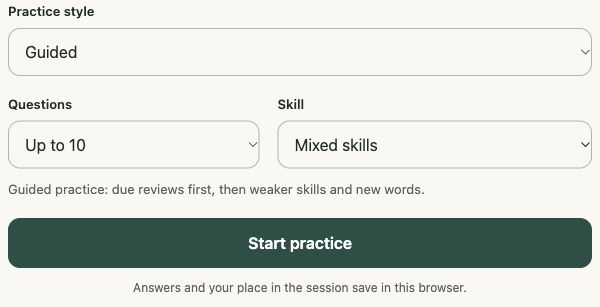
Choose Guided, Focused or Custom practice
Guided combines meaning, tones, pinyin, sentence completion and sentence skills. Use it when you want a mixed session without selecting each skill.
Focused centres on producing the Chinese word. Speaking can join this style when enabled and supported. Use it when you recognise vocabulary but struggle to produce it from a prompt.
Custom lets you choose skills in Profile → Practice preferences. Listening, speaking and voice replies depend on browser capabilities and permissions. If speech recognition is unavailable, choose a supported typed or choice task.
Preferences apply when you start a session. Choose writing practice when you want to check whether you can produce the characters from a prompt.
Understand what the progress means
A word’s progress is shared across lists. If 朋友 appears in both your reading list and your travel list, it keeps the same vocabulary history. You do not have to build that history twice.
Progress is also separated by skill. Getting a meaning question right does not establish that your tones, listening or writing are equally strong. Use the skill results to decide what to practise next.
Return to Study when reviews become due. The queue uses saved history; the exact next review can change as you answer. Adding a large collection is useful for browsing, but you can keep an individual session small.
Pause without losing the session
Use Save and leave inside a session. On the Practice screen, Resume session opens the saved round. Saved answers are kept; an unanswered question restarts.
Check the account label above Study. Guest progress belongs to this browser. Signing in and completing sync is the route to using account data on another device. A list download carries vocabulary, while a study backup serves a different purpose.
After practising 茶 and 喝, return to the sentence and read it without opening the definitions. Being able to follow the sentence is a useful second check alongside the session score.